
Money Eco: Budget / Expense
Apponance, Inc.Finance
4.711.00 Reviews
- Version
- 7.1.0
- Installs
- 10.00K
- Age Rating
- Everyone
Screenshots
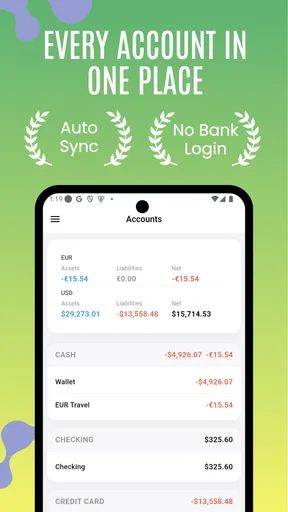
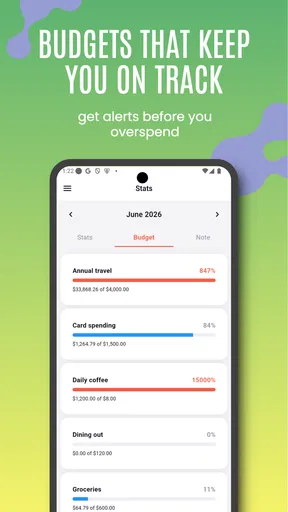
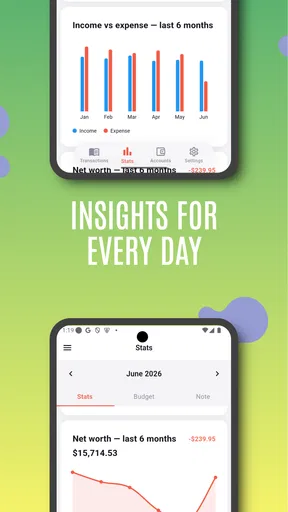
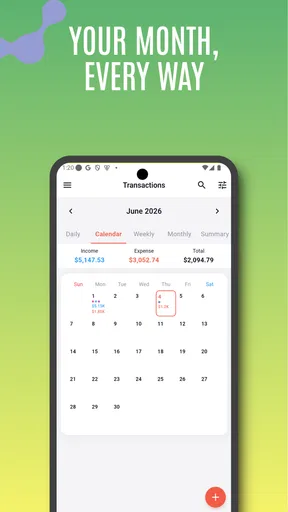
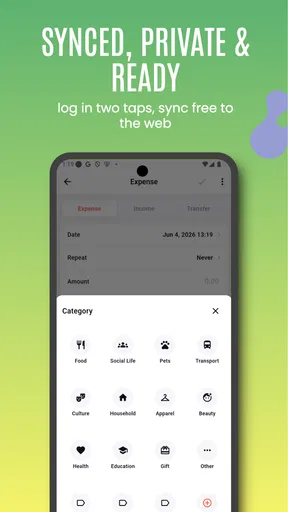
Our Review of Money Eco: Budget / Expense
 Analysis by Appyee
I like finance apps that help me understand my habits without making everyday budgeting feel like a second job. Money Eco: Budget / Expense takes that practical route. It is a free personal finance app from Apponance, Inc., built around recording spending, organizing a budget, and turning money activity into visual reports. After using it as a lightweight spending companion, I found its main appeal easy to explain: it gives you a clearer picture of where your money is going without demanding the complexity of a full banking platform.
The app is aimed at people who want to be more intentional with money, whether that means watching small daily purchases, checking a monthly budget, or looking for patterns that are difficult to notice in a bank statement. Its store summary focuses on money management, expense tracking, and visualization, and that matches the experience I would recommend it for. It works best as a deliberate, hands-on budgeting notebook with visual feedback, rather than as an all-in-one financial command center.
How Money Eco feels during everyday use
I find the most useful way to judge Money Eco in everyday life is to ask whether its manual routine fits the moments when I actually spend. A quick note after a purchase can keep the record fresh, while a weekly check helps turn entries into a decision rather than a pile of numbers. That balance between effort and insight is what shapes my view of its trust and control.
A quick start, with a manual habit at the center
The first thing to understand is the app’s likely rhythm: you get the most value when you enter purchases consistently and then return to the reports with a question in mind. “Where did my flexible spending go?” is a useful question. “Can I reduce takeaway meals next month?” is even better. The visual side becomes meaningful only after the app has enough personal information to show a pattern, so the quality of the result depends heavily on the quality of the entries.
That makes the app a good fit for someone who wants awareness rather than automation. If you prefer to type in a purchase immediately, or review a few transactions at the end of the day, the process can become pleasantly simple. If you expect your bank accounts and cards to populate everything automatically, this may feel slower than a connected banking service. That is not necessarily a flaw; it is a trade-off between direct control and convenience.
In my view, the perceived speed of a finance app is not just about how fast a screen opens. It is also about how quickly you can answer a money question. Money Eco has a straightforward purpose, so it does not need to carry the mental weight of investment dashboards, credit monitoring, or bill negotiation tools. That narrower focus can make a short budgeting check feel less intimidating.
What a realistic week looks like
Imagine using it during a normal workweek. On Monday, you record groceries and a coffee. On Wednesday, you add transport and an unplanned lunch. By Friday, you can look back at the categories and see whether the small purchases were actually small in total. The useful moment is not the individual entry; it is the comparison between what you thought you were spending and what the accumulated record shows.
I would suggest creating a simple routine instead of waiting for a major financial reset. Enter expenses soon after they happen, then choose one quiet moment each week to inspect the visual report. This avoids the common problem of trying to remember several days of purchases at once. It also gives the charts a practical role: they become a prompt for a decision, not decoration on a screen.
A less obvious benefit of this workflow is that it can expose irregular spending that a monthly total hides. A single large purchase may look like the main problem, while repeated small transactions quietly consume more of the budget. Reviewing categories and timing together helps separate those two situations. The app is therefore more useful when you treat it as a behavior-review tool, not merely a place to store receipts.
Where the visual reports help most
Visualization is valuable when raw numbers feel abstract. A list of transactions can tell me what happened, but a visual summary makes the balance between categories easier to grasp. That is especially helpful for people who do not naturally enjoy spreadsheets. The report can turn a vague feeling—“I seem to be spending too much”—into a more specific conversation about food, transport, entertainment, or another area in the personal budget.
There is a practical trade-off here. A visual report can make trends easier to notice, but it cannot decide whether a purchase was worthwhile or whether a category is realistic. You still need to interpret the result in context. A month with an unusual repair, trip, or family expense should not automatically become the template for every future budget. I appreciate the app more when I use its visuals as evidence for reflection rather than as an unquestionable verdict.
Heavy-use moments and the limits of scale
Light and moderate use should be the comfortable territory for an app with this focused purpose. A person tracking household purchases, personal spending, or a few budget categories is asking for a manageable record and readable summaries. The experience becomes more demanding when you try to turn it into a detailed accounting system with many accounts, complicated splits, or years of historical transactions.
This is where expectations matter. Money Eco is positioned as a finance app for budgeting and expenses, not as professional bookkeeping software. If you regularly need reconciliation, business ledgers, tax records, shared approval workflows, or extensive financial forecasting, I would choose a specialized tool instead. Adding more and more detail to a lightweight tracker can create friction without giving you the controls that a dedicated accounting product provides.
There is also a human performance issue during heavy use. Entering every small purchase with excessive precision can make budgeting feel like administrative work. My recommendation is to choose a level of detail you can sustain. Track the categories that influence your decisions, and avoid building a system so elaborate that you stop maintaining it. The best budget is the one you will still update when the week becomes busy.
For a household, I would be cautious about assuming that one person’s entries automatically solve shared-finance problems. A couple may need agreed categories, a common routine, and a clear rule for recording joint purchases. The app can support the habit, but the household still has to decide how to use it. That distinction is important: a personal expense tracker can improve visibility without replacing communication between people who share money.
Stability, recovery, and confidence in the record
Finance software earns trust differently from a game or social app. A colorful interface is not enough; I want to feel that the record I create will remain understandable when I return to it later. Money Eco’s focused design gives it a sensible role as a personal log, but I would still approach any manually maintained financial record carefully. Review entries periodically, correct mistakes when you notice them, and avoid assuming that a chart is accurate if the underlying category or amount was entered incorrectly.
Recovery is another reason to keep your workflow simple. If you have been away from the app for several days, restarting with a short review is better than abandoning the budget because the backlog feels overwhelming. I would reconstruct the most important expenses first, then return to a normal routine. This is a small but useful strategy: it treats missed tracking as a recoverable interruption instead of a failed budgeting attempt.
I also recommend keeping the app’s role clear in your financial setup. It can help you organize spending and see personal patterns, but it should not be the only place you rely on for important financial records. Use your normal bank or payment statements when you need to verify a transaction. That is not a criticism of this particular app; it is sensible practice for any manual tracker, because a forgotten entry can affect the report even when the original payment was processed correctly elsewhere.
The app has a current version of 7.1.0, and it supports devices running Android 7.0 or later. Those details make it accessible to people using older Android hardware, although compatibility alone does not tell me how every phone will behave under every workload. On a modest device, I would keep expectations realistic and avoid judging performance from a single slow screen or a busy report. The important question is whether the normal record-and-review routine remains comfortable for you.
Resource demands and device constraints
A focused expense tracker should generally be less demanding than a finance app that constantly synchronizes several services or renders complex market data. Money Eco’s purpose suggests a relatively contained workload: recording money activity and presenting it visually. Still, I would not promise identical responsiveness across all phones. Device age, available storage, background activity, and the amount of history you keep can all influence how an app feels.
For an older Android phone, the sensible approach is to test the basic loop first: open the app, add a normal expense, review a report, and return to the main view. If that routine feels comfortable, the app is probably a reasonable match for your needs. If your phone already struggles with ordinary apps, a finance tool that you must open frequently may become frustrating even if its feature set is appropriate.
Resource demands also include your attention. A budget app that asks you to classify every transaction in a complicated way can consume more time than expected. I would start with a compact category structure and expand it only when the reports reveal a real need. This is one of the most useful ways to keep the experience responsive in a broader sense: fewer unnecessary decisions mean faster entry, fewer inconsistent labels, and cleaner summaries.
Free access and the question of paid extras
Money Eco is free to download, with optional in-app purchases ranging from $0.99 to $14.99 per item. That makes it easy to try without committing money upfront, which is valuable for a budgeting tool because usefulness depends so much on personal routine. I would spend enough time with the basic workflow before considering any purchase. First decide whether you actually record expenses and consult the reports; only then can an optional upgrade be judged fairly.
My advice is not to buy an extra merely because you feel guilty about an incomplete budget. Paid features cannot repair a routine that does not fit your life. If you enjoy the app’s method and find yourself returning to it consistently, an optional purchase may make sense for you. If you need automatic financial connections, advanced accounting, or a more comprehensive household system, spending money inside this app may not solve the underlying mismatch.
Who should choose it, and who should look elsewhere
I would recommend Money Eco to a student, first-time budgeter, or anyone who wants a clearer view of everyday spending without starting with a complicated financial suite. It also suits people who learn visually and prefer seeing category patterns instead of reading a long transaction list. Someone trying to reduce impulse purchases may find the regular entry habit particularly useful because it introduces a pause between spending and forgetting.
I would be more hesitant to recommend it as the main tool for a small business, a household with intricate shared finances, or a person who needs verified accounting records. It may also disappoint users who expect automatic bank synchronization or a completely hands-off experience. A spreadsheet can be better when you want custom formulas and total control. A bank’s own app can be better when your priority is checking confirmed transactions. A dedicated accounting platform can be better when reporting and reconciliation matter more than simplicity.
The app’s public footprint is modest but encouraging: it has over 10 thousand installs and a 4.7 average from 54 ratings, alongside 11 written reviews. I would treat that as a useful sign of interest rather than proof that it will suit every budgeting style. The Everyone age rating also makes it broadly approachable, but age suitability does not replace financial judgment. Young users still need to understand what a budget category means and why an app’s record should be checked against real statements.
My practical setup for better results
When I test a budgeting app, I try to prevent it from becoming a passive archive. With Money Eco, I would begin by defining only the categories that can change my behavior. For example, separate essentials from flexible spending, then divide flexible spending only where the distinction helps you make a choice. This approach keeps reports readable and reduces the chance that similar purchases end up scattered across too many labels.
Next, I would create a short weekly review question. It might be “Which category surprised me?” or “What can I adjust before next week?” One question is enough to turn the visual report into an action. A long review checklist can make the process feel like work, while a focused question encourages a useful response without requiring a complete financial audit.
Finally, I would use a temporary category for uncertain purchases rather than guessing immediately. At the end of the week, move those entries into their proper place once the context is clear. This avoids inconsistent categorization, which can distort a report more than a slightly delayed entry. It is a small workflow improvement, but it matters because the app’s insights are only as clean as the structure behind them.
My performance verdict
Money Eco: Budget / Expense is most convincing as a focused, visual companion for people who want to build a manual spending habit. Its likely performance advantage is not a promise of spectacular speed; it is the fact that the app concentrates on a smaller job than a full financial suite. That focus can make opening the app, recording a purchase, and checking a pattern feel manageable, especially on a compatible older Android device.
Its main weakness is the same thing that gives it character: it depends on your participation. If you want automatic data collection, professional accounting, or a shared financial workspace, another option will probably serve you better. If you are willing to enter expenses and use the reports as prompts for real decisions, the app offers a practical way to make invisible spending more visible.
Developed by Apponance, Inc., it is a free finance app with optional purchases, broad age suitability, and a focused purpose. I would recommend trying the basic workflow with one week of ordinary spending rather than judging it from a single glance. If the routine feels quick enough, stable enough, and useful enough to repeat, Money Eco can become a simple but effective checkpoint between spending money and understanding it.
My final recommendation: choose it when clarity and a manageable manual habit matter more than automation. Skip it when your finances require connected accounts, advanced records, or complex collaboration. For the right user, its strength is not doing everything; it is making the everyday question “where did my money go?” easier to answer.
Verdict
Strengths of Money Eco: Budget / Expense
- Simple interface makes daily expense tracking quick and approachable.
- Useful budget categories help organize spending without much effort.
- Clear summaries make it easier to spot spending patterns over time.
- Suitable for users who want a lightweight personal finance tool.
- Expense entry can encourage better awareness of everyday purchases.
Limitations of Money Eco: Budget / Expense
- May lack advanced investment and financial planning features.
- Manual data entry can become tedious for users with many transactions.
- Budget insights may be limited compared with full-featured finance apps.
- Some features may require time to configure before they feel useful.
- Privacy-conscious users should review how financial data is stored and handled.
Similar Picks in This Category
View All
Google Wallet
Google LLC4.3

Airtel: Recharge, Bank & Loans
Airtel4.0

PayPal - Pay, Send, Save
PayPal Mobile4.2

DANA Indonesia Digital Wallet
PT Espay Debit Indonesia Koe4.5

Binance: Buy Bitcoin & Crypto
Binance Inc.4.8

Cash App
Block, Inc.4.7
Frequently Asked Questions
What is Money Eco: Budget / Expense, and what can I use it for?
Money Eco: Budget / Expense is a personal finance app designed to help you record income, track daily spending, organize transactions into categories, and understand where your money goes. After testing its main features, it feels most useful for users who want a simple overview of their finances rather than a complicated investment or banking platform. You can use it to create a budget, monitor expenses, and build better spending habits.
Does Money Eco: Budget / Expense connect directly to my bank account?
Money Eco: Budget / Expense is primarily intended for manually managing your finances, so users should not assume that it automatically connects to every bank or imports transactions without configuration. This can be an advantage for people who prefer privacy and control over their financial records. However, manual entry requires consistency, and the app is most effective when you record purchases, income, and recurring payments regularly.
Is Money Eco: Budget / Expense free to download and use?
The app may be available to download at no initial cost, but the exact features included in the free version can depend on the platform, region, and current developer policies. Some budgeting applications offer optional premium tools, advertising, or in-app purchases for advanced functions. Before downloading, check the Google Play Store or App Store listing carefully for subscription details, limitations, and whether any feature you need requires payment.
Is my financial information safe when using Money Eco: Budget / Expense?
Because budgeting apps can contain sensitive information, you should review Money Eco: Budget / Expense’s privacy policy and permission requests before entering detailed financial data. Avoid storing banking passwords, card PINs, or unnecessary personal information in a budgeting app. It is also sensible to use device security such as a screen lock, keep the application updated, and confirm whether your data is stored locally, synchronized online, or shared with third parties.
Who would benefit most from using Money Eco: Budget / Expense?
Money Eco: Budget / Expense is a good choice for students, families, freelancers, and anyone who wants a clearer picture of everyday spending. It can be especially helpful if you often lose track of small purchases or need a straightforward way to follow monthly limits. Users seeking professional investment analysis, automatic bank synchronization, credit monitoring, or advanced financial planning may find the app less suitable and should compare its features with specialized alternatives.
